Senin, 21 Februari 2011

[HOW-TO] - Removing Video Source from XBMC List (Apple TV 2)
Surprisingly the solution is very simple!
Select the Video source you want to delete, press and Hold "Menu" (which is equivalent to "C") if your Apple TV 2 Remote Control. a menu will appear for editing, removing, etc...
Select the Video source you want to delete, press and Hold "Menu" (which is equivalent to "C") if your Apple TV 2 Remote Control. a menu will appear for editing, removing, etc...
Minggu, 20 Februari 2011
Game On! Which Mobile Gaming Device is Right for You?
When you look through the store for a new mobile gaming device, you may see a few options. How do you know which one is the one you should be taking home?
The two main players in the mobile gaming market are Sony, with it's Playstation Portable, and Nintendo, with it's DS. Both companies have announced a new model of their device which are not out currently. Nintendo's new model will be available March 27, 2011, while Sony's new device's release date is yet to be announced.
Nintendo's DS is geared towards more casual gamers. Pokemon, Mario, and Zelda work great with this device. There is a Call of Duty game on the DS, but the graphics aren't great, and there aren't many games like it on the DS.
The DS uses two screens one on each half of the device. The device folds like a typical clamshell laptop. The top screen is usually where most of the action in a game happens, while the bottom screen, a capacitive touchscreen, is where additional data or controls usually go. On the two sides of the bottom screen are the A,B,X, and Y buttons, while the other side houses the up, down, right, and left buttons.
The DS is now in it's 4th generation, with the 5th, the 3DS, coming late March. The current model, the DSi XL, measures in at a pretty big 4.2 inches tall, and 6.34 inches across, and weighs about twelve onces.
 At a newly lowered price of $169.99 you get, along with the obvious ability of playing games, a front and rear facing camera (although no videochat), as well as some cool effects to add to your photos. The DSi XL includes a microphone, which, along with being useful for blowing up balloons in Mario Cart, can also be used to record sound clips, which can later be edited on the DS.
The DS's online features allow for one to download games and add on's from the DSi Ware store. The device also includes a web browser.
If you want all of the features of the DSi XL, but don't like the big size, the $149.99 DSi is fine.
The game selection on the DS is pretty big, but is focused on casual games. Nintendo brings some exclusive games to the DS, like Mario and Pokemon.
The next generation of the DS, the 3DS, is probably worth waiting until late March for. It's the first mobile gaming device with 3D capability. Read my review here for more info.
Sony's Playstation Portable, or PSP, is the device for more serious gamers. You'll get great graphics for games like Call of Duty, but casual games are harder to find.
The PSP 3000 directly competes with the DSi XL with the MSRP of $169.99. For the same price as the DSi XL, you get more intense graphic capabilities, a built in microphone, a big 4.3 inch screen, and even the ability to make calls using Skype.
 Although most don't think of an iPod as a gaming device, the iPod Touch is close to outselling both the DS and the PSP. The iPod Touch is surprisingly good with games, but almost all of the games on the Touch are aimed at very casual games.
The two main players in the mobile gaming market are Sony, with it's Playstation Portable, and Nintendo, with it's DS. Both companies have announced a new model of their device which are not out currently. Nintendo's new model will be available March 27, 2011, while Sony's new device's release date is yet to be announced.
NINTENDO DS
Nintendo's DS is geared towards more casual gamers. Pokemon, Mario, and Zelda work great with this device. There is a Call of Duty game on the DS, but the graphics aren't great, and there aren't many games like it on the DS.
The DS uses two screens one on each half of the device. The device folds like a typical clamshell laptop. The top screen is usually where most of the action in a game happens, while the bottom screen, a capacitive touchscreen, is where additional data or controls usually go. On the two sides of the bottom screen are the A,B,X, and Y buttons, while the other side houses the up, down, right, and left buttons.
The DS is now in it's 4th generation, with the 5th, the 3DS, coming late March. The current model, the DSi XL, measures in at a pretty big 4.2 inches tall, and 6.34 inches across, and weighs about twelve onces.

The DS's online features allow for one to download games and add on's from the DSi Ware store. The device also includes a web browser.
If you want all of the features of the DSi XL, but don't like the big size, the $149.99 DSi is fine.
The game selection on the DS is pretty big, but is focused on casual games. Nintendo brings some exclusive games to the DS, like Mario and Pokemon.
The next generation of the DS, the 3DS, is probably worth waiting until late March for. It's the first mobile gaming device with 3D capability. Read my review here for more info.
SONY PLAYSTATION PORTABLE
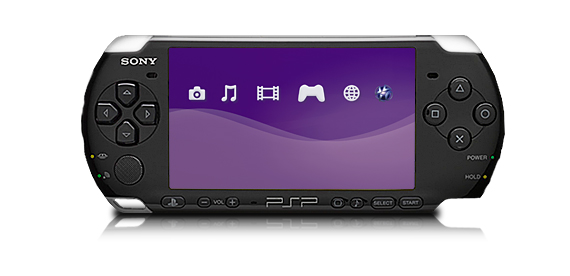 |
| PSP 3000 |
The PSP is available in two models, the PSP 3000, and the PSP Go. The 3000 is a device about 6.7 inches across, and 2.7 inches tall. At 6.7 grams, the PSP 3000 is almost half the weight of the DSi XL, making it much more portable.
The PSP 3000 uses small CD-like disks for games and movies, but also has support for storing content on a memory card.
The front of the PSP 3000 houses the 4.3 inch screen, as well as the legendary Playstation buttons. On the other side of the screen is the up, down, left, and right buttons. A mini joystick can be found right under the directional buttons.
With the PSP's built in WiFi, you can surf the net, download RSS podcasts, and even download and read comics. The PSP also allows you to remotely play games on your Plastation 3 (a device you hook up to the TV) that's at home.
 |
| PSP Go |
The PSP Go is almost identical in features to the PSP 3000, the main difference is the fact that you have to download games onto the device, as there is no disk drive. The Go also sports a slide out piece that houses the controls.
Sony recently announced a new model of the PSP, known as the PSP2. This device sports a touchscreen and some more new features, but no pricing or release date information is available yet.
SURPRISE, THE IPOD TOUCH
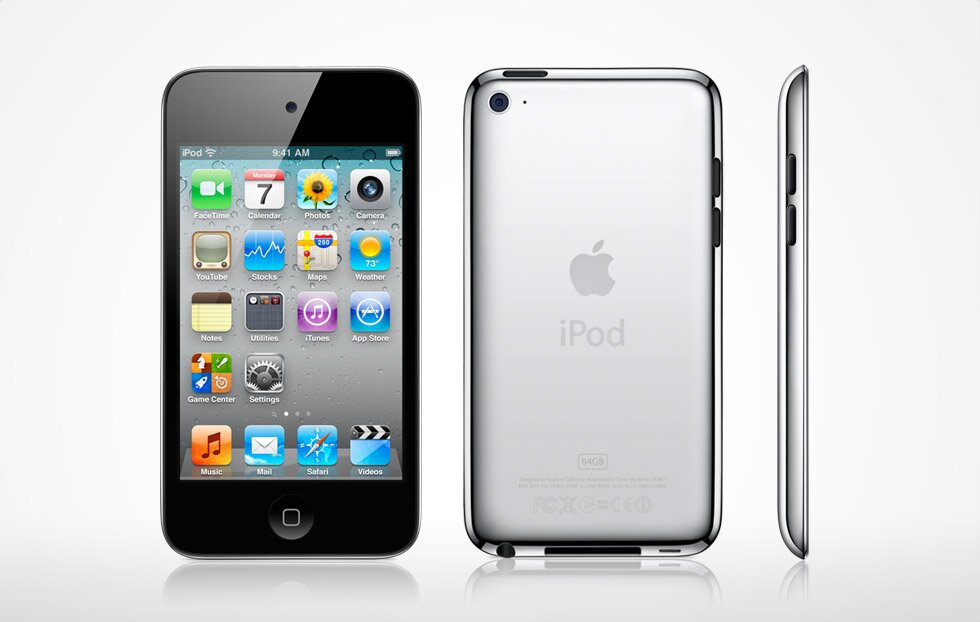
The iPod Touch is not only a gaming deice, and also allows you to install other apps to do things like read books, book airline tickets, and manage your calander.
See my review of the entire line of iPods for more details on the Touch here.
Overall, the iPod Touch is great for the very casual gamer who also wants to listen to music, watch movies, and even be productive on their gaming device. For the gamer who wants a device mostly devoted to gaming, but still focusing on more casual games, the DS is a great device. The more extreme gamer should go with the PSP. While he PSP has the ability to play movies and other content, it's much better at gaming, and you'll probably find that that's all you're doing with it.
[HOW-TO] - Watch .avi formated Videos in Apple TV 2
- At first I managed to install XBMC on my Jailbroken Apple TV 2 correctly.
- But I am unable to correctly install the Video sources.
- However, below is how I do it on my Macbook Air.
- You’ll need a jailbroken AppleTV and either the Boxee or XBMC apps. I prefer XBMC because I like its simpler and modern interface. Boxee is too bloated and I hardly use it.
- First, you’ll need to set up your Mac OS X (please go elsewhere for help on Windows; I’m a strict Mac user) to support SMB networking. To do so, launch your Mac OS X’s System Preferences -> Sharing -> (Tick) File Sharing -> Option -> (Tick) Share files and folder using SMB (Windows), and tick your user account followed by entering an access password of your choice. Congrats, you have enabled your Mac OS X’s SMB support!
- Next, you’ll tell OS X which folder or folders you want to allow Sharing, ie, give access to XBMC. Let’s share the “Downloads” folder where you are keeping your .avi/.wmv/.rmvb etc files. From the Finder, select the “Downloads” folder and right-click to select “Get Info”. In the pop-up Get Info window, tick the “Shared folder” check box under the “General” section, and you’re done.
- Repeat for any other folders you want to give XBMC access to. Although you can share an entire hard disk but I suggest you do not do that as both XBMC and Boxee will take seemingly forever to scan the huge contents! Just add individual Share points/folders for better management and privacy.
- To watch a .rmvb in the “Downloads” folder using XBMC, simply launch your AppleTV’s XBMC app from the “Launcher” menu and select “Videos” from the options. You should now see a list of folders except the “Downloads” folder because you haven’t added it.
- Let’s add it now; select Add Source -> Browse -> Windows network (SMB) [you'll probably need to scroll down to see it] -> WORKGROUP -> Your Mac -> Highlight the “Downloads” folder -> Confirm it by selecting “OK” [press the left "prev. track" button on the Remote]. Finally give it a nice name and save it. Done.
- Do note that when you enable a folder, you also enable every sub-folders within it. To exclude a sub-folder, “Get Info” on it and un-tick the “Shared folder” option for it.
- You can now select the newly added “Downloads” folder from the list, locate the .rmvb file and play it on your big screen TV!
- While watching any video, pressing and holding the “Play/Pause” button for a few seconds will drop down a Controller where you can control the video, make adjustments to its audio and video settings etc. Press “Menu” to dismiss it. You can also press the +/- buttons to adjust the volume, the left/right buttons to rewind/fast forward (press again to adjust the rate of change between 2X to 16X.)
- To exit XBMC, press “Menu” until you return to XBMC Home screen. Then press the left button to go down to the “Power” menu… and select “Exit” from the options.
Sabtu, 19 Februari 2011
[HOW-TO] ; Install XBMC on AppleTV 2G (Working)
NOTE: I have tried the method below but it doesn't work. Thus, I tried this one and it works!
After you’ve done that, follow these steps.
1st Step: Open a terminal app as you’ll need to gain SSH access to your AppleTV.2nd Step: Type ssh root@apple-tv.local – if that doesn’t work for you, instead of typing apple-tv.local, replace it with your AppleTV’s IP address which can be found under Settings then Network on your AppleTV.

3rd Step: You’ll be asked for the password to your AppleTV next. By default, it is alpine. If you have changed it, enter the password you chose on your own instead. You may be asked if you’re sure you wish to continue, just type “yes”.
4th Step: Once you are at the root menu, type (or copy/paste) this: echo "deb http://mirrors.xbmc.org/apt/atv2 ./" > /etc/apt/sources.list.d/xbmc.list and hit “enter”.
5th Step: Next type (or copy/paste) this: apt-get update and hit “enter”.
6th Step: A list of available apps will populate. Type (or copy/paste) this: apt-get install org.xbmc.xbmc-atv2 and hit “enter”.
7th Step: You’ll see the app begin to install and once it reaches 100%, you’re done. Your AppleTV should flash briefly and when the main menu pops back up, XBMC should be added.
After you’ve done that, follow these steps.
1st Step: Open a terminal app as you’ll need to gain SSH access to your AppleTV.2nd Step: Type ssh root@apple-tv.local – if that doesn’t work for you, instead of typing apple-tv.local, replace it with your AppleTV’s IP address which can be found under Settings then Network on your AppleTV.

3rd Step: You’ll be asked for the password to your AppleTV next. By default, it is alpine. If you have changed it, enter the password you chose on your own instead. You may be asked if you’re sure you wish to continue, just type “yes”.

4th Step: Once you are at the root menu, type (or copy/paste) this: echo "deb http://mirrors.xbmc.org/apt/atv2 ./" > /etc/apt/sources.list.d/xbmc.list and hit “enter”.
5th Step: Next type (or copy/paste) this: apt-get update and hit “enter”.

6th Step: A list of available apps will populate. Type (or copy/paste) this: apt-get install org.xbmc.xbmc-atv2 and hit “enter”.

7th Step: You’ll see the app begin to install and once it reaches 100%, you’re done. Your AppleTV should flash briefly and when the main menu pops back up, XBMC should be added.

Lepidoptera Sighting In My Studio...
Lepidoptera…
In my studio? Really?
Hmmm...

Hopefully very soon they will be fluttering to yours so they can become part of a beautiful piece of jewelry…
My Etsy shop on Monday most likely!

These took shape in the studio last week.
They were created and fired within two days.
Quite the short instar if you ask me…
But I will not complain...

Colors were chosen to paint on their wings…
The four butterflies above and the ones in the next two pictures are all my Autumn Glaze.
All from the same firing…
All placed right next to one another in the kiln…
All images photographed towards the end of my natural daylight window - which is why they are so dark.
Oh, but That Blue…
That Blue Purple…
That Blue Purple Copper Brown...

So just as mother nature brings variations to species…
And to individuals within those species…

I bring you some limited editions…
Limited because that is my new thing to keep myself here in this creative place for a while…
I make what I want and will put it out there to sell.
Sure I can make these in any of my glaze colors.
I could probably have them available in any of my textures…
But that is just not in my heart right now.
You can ask… I will probably throw yours in there with mine!
I also have issues with not being able to make you something you really want…
I'm a people pleaser deep down. It makes me feel good to make people happy.
My heart is fluttering about…
Enjoying this creative area I have placed myself.
About to venture into the new world of Master Gardener Training…
Into a place that will give me better knowledge for better understanding and implementation of my new set of skills. Even right here in my own experimental garden backyard.

Kind of like how Riley must be feeling now that he has just about mastered walking and is about to start running (he is getting fast!). But still super clumsy - which is adorable yet makes me flinch when he is near a pointy corner on furniture.
Oh, and this picture - was from today as I was trying to photograph some pieces in fleeting bits of indirect sunlight in the kitchen. Those hands were reaching for everything and he was loving it, cracking up the entire time. Constantly trying to peek at what he was grabbing and but could not see.
Wish I could've gotten a non-blurry photo of his little eyes and the smile you could see in them…
Monday - Lepidoptera take flight…
Lepidoptera Sighting In My Studio...
Lepidoptera…
In my studio? Really?
Hmmm...
Hopefully very soon they will be fluttering to yours so they can become part of a beautiful piece of jewelry…
My Etsy shop on Monday most likely!
These took shape in the studio last week.
They were created and fired within two days.
Quite the short instar if you ask me…
But I will not complain...
Colors were chosen to paint on their wings…
The four butterflies above and the ones in the next two pictures are all my Autumn Glaze.
All from the same firing…
All placed right next to one another in the kiln…
All images photographed towards the end of my natural daylight window - which is why they are so dark.
Oh, but That Blue…
That Blue Purple…
That Blue Purple Copper Brown...
So just as mother nature brings variations to species…
And to individuals within those species…
I bring you some limited editions…
Limited because that is my new thing to keep myself here in this creative place for a while…
I make what I want and will put it out there to sell.
Sure I can make these in any of my glaze colors.
I could probably have them available in any of my textures…
But that is just not in my heart right now.
You can ask… I will probably throw yours in there with mine!
I also have issues with not being able to make you something you really want…
I'm a people pleaser deep down. It makes me feel good to make people happy.
My heart is fluttering about…
Enjoying this creative area I have placed myself.
About to venture into the new world of Master Gardener Training…
Into a place that will give me better knowledge for better understanding and implementation of my new set of skills. Even right here in my own experimental garden backyard.
Kind of like how Riley must be feeling now that he has just about mastered walking and is about to start running (he is getting fast!). But still super clumsy - which is adorable yet makes me flinch when he is near a pointy corner on furniture.
Oh, and this picture - was from today as I was trying to photograph some pieces in fleeting bits of indirect sunlight in the kitchen. Those hands were reaching for everything and he was loving it, cracking up the entire time. Constantly trying to peek at what he was grabbing and but could not see.
Wish I could've gotten a non-blurry photo of his little eyes and the smile you could see in them…
Monday - Lepidoptera take flight…
Langganan:
Postingan (Atom)