Tampilkan postingan dengan label Google Chrome. Tampilkan semua postingan

Rabu, 07 Desember 2011

Chrome OS: One Year Later

PhotoI never really imagined this day coming. But it's here. It's one year after Gadgetator's first post ever. So much has happened since them, and a big thanks goes out to Leo Laporte, host of the nationally syndicated Tech Guy radio show, on which Gadgetator got it's big boost. But enough about my blog. Let's get right to what this post's really about.

One year ago, on this day, I posted an article talking about Google's announcement of the Cr48, one of the major advancements in Google's Chrome OS operating system. If you are unfamiliar with what Chrome OS is, read the article here. In that article, I promised I would post a follow up after playing a bit with Chrome OS. I never did. Until now.

A lot has happened with Chrome OS in the past year. For example, a Chrome OS screenshot one year ago (see figure 1), as apposed to a Chrome OS screenshot today (see figure 2). After actually using a device running solely Chrome OS for close to half-a-year, I have developed a new opinion, and I'm here to share that. I guess this article is an overview of Chrome OS: one year later.

Figure 1
In a short recap of what was said in Gadgetator's first ever article, Chrome OS is basically a computer that only has a web browser. When you first open it up, you get your homepage, opening a new tab brings you to a page that basically contains a grid of glorified bookmarks. To a bunch of web pages. This all sounds great and all, but there's one major disadvantage. You lose all of your native applications. No more Photoshop, Microsoft Word, or iTunes. Everything you do has to be done online. Some might say that's impossible. That this'll never work. On first sight, one year ago, that's what I said. I quote myself saying, "There are great web apps out there, but I believe that for this to be a success, there need to be more great web apps. And until we get some of the most widely used native applications online, Chrome OS will be for the very light computer user."


Figure 2
After using Chrome OS almost exclusively for half-a-year, it's apparent I've changed my mind. You see, I was kind of pushed into using Chrome OS. Google offered its Cr48 to a limited number of beta testers to get feedback for the final product. I was one of those lucky recipients. 


Not wanting to just toss aside something  I received for free, plus taking into account what Google actually intended for me to do with the device, I decided to give it a fair try. I never really went back.


I was already stuck in the Google Universe. I used Gmail, Google Docs, Google Reader, and many other online alternatives to native desktop apps. As soon as I switched to Chrome OS, I found it surprisingly easy to find great online alternatives to any desktop apps that I need. Because I have a "real" computer, I could even print directly from Chrome OS using Cloud Print. Of course, I gave up some conveniences, but I believe that was a fair price to pay for the simplicity I now gained. No complex files, programs messing up your system, virus issues, or any other junk that comes along with a Windows or Mac computer. I couldn't have used this as my only computer, I still use iTunes regularly, but it definitely works a great, simple replacement.
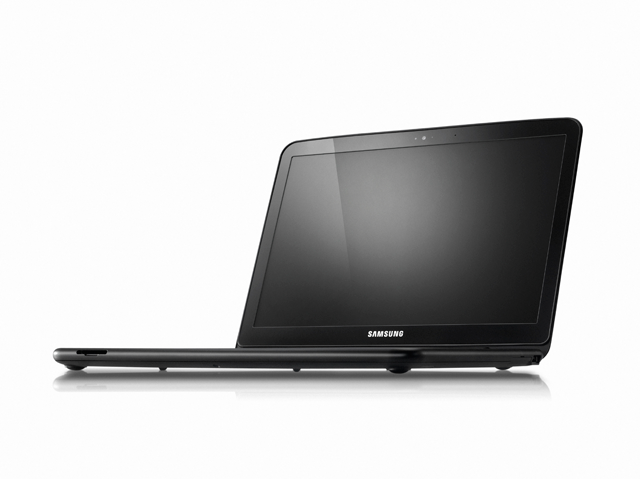
The Samsung Chromebook


Google now licences Chrome OS to manufacturers, who created their own 'Chromebooks'. Currently, both Samsung and Acer have a few models, which run from about $300-$450. At that price, it might be smarter to get a low-end Windows machine, but if you're willing to pay that price for simplicity's sake, it may be worth it. I think that, at this point, Chrome OS and the Chromebooks are great for either simple-computer users who don't want to be confused by the complexities of a "real" operating system, or to be used as a companion to a "real" computer, as Chrome OS has a clean interface, amazing boot time, and easy access to the web.  


Have you played with Chrome OS or the Cr48? Did you take the plunge and buy a Chromebook? What are your experiences with Google's Chrome OS? Like it? Drop a comment below with your experiences.

Kamis, 30 Desember 2010

Netflix, iTunes, K Mart?

     Most are aware of the popular video streaming and downloading services. These include NetflixiTunes, Amazon's Video on Demand, and more. These are all services that let you either buy individual movies or TV shows, or, in Netflix's case, stream an unlimited number of movies and TV shows for a monthly fee.
     Apparently the idea of getting content online as opposed to walking into a shop such as the slowly falling Blockbuster, which has also started getting into the on demand market, became very popular. Popular enough that Sears and K Mart partnered up with a digital media software company called Sonic to create an online movie and TV show download site called Alphaline Entertainment.
Alphaline Entertainment Homepage
     Alphaline Entertainment may have some catch-up to do, because, although this is not a giant difference, movie buying prices are a few dollars more on Alphaline. The rental prices are the same at $2.99, but iTunes has TV rentals for 99 cents, while Alphaline only has TV purchasing.
     When watching a trailer on Alphaline vs. Amazon, Alphaline's video quality was noticeably better, but took longer to load. On Amazon, the trailer played fine in my Google Chrome browser, but on Alphaline, I had to open Internet Explorer (Which crashed on me. Again). Also, to log in, and pretty much to do anything else on Alphaline, you must be using Internet Explorer or Firefox.
      I then purchased an episode of the 1962 show The Jetsons. When I tried downloading it, the Alphaline Website told me to download the RoxioNow Media Player, which is free. After I got the RoxioNow software, I tried to find a way to download the TV episode. I still have not been able to find a way to download the media.
     Until I can get either 1. My download, or 2. My $1.99 back, I don't plan on using Alphaline again, and I don't recommend it for you. Also, how much do you trust Sears and K Mart to know about downloads, web sites, and software programs?
     For now, Alphaline Entertainment seems like a big red flag. Unless you want to watch high quality movie trailers online.

UPDATE: The problem I had with downloading the video was something with Google Chrome. To download the episode, I needed to be using Firefox, not Internet Explorer or Google Chrome. To watch a trailer on the site, I needed to be using Internet Explorer. Strange, huh?

Well, I did get my $1.99 worth of video, but iTunes: better, cheaper, and easier.

Minggu, 12 Desember 2010

Startup tips: your new PC

 
iTunes
     Those first few days are really fun. You've taken the new laptop out of it's box. It smells new, looks new. Your new $500 baby. You turn it on, waiting for it's first boot, it's first time launching Windows 7, and then it hits you. What can you do with it. All it has is basically a web browser and maybe a trial version of Microsoft Office.
     What do you install, what do you download? This may help.
     First of all, get rid of Internet Explorer, at least until Internet Explorer 9 comes out. I recommend Google Chrome, a  different,  faster, and easier web browser, you can    get it at google.com/chrome.
     If you own an iPod or iPad, iTunes is a must-have, even if you don't      have an iPod, just to organize your music and videos , iTunes is my favorite, get it here at apple.com/itunes.
     You'll probably need a word processor, and if you don't plan on spending at least $150 on Microsoft Office, OpenOffice.org is a great free alternative, it includes a word processor, a presentation maker, a spreadsheet creator, and more. It is available as a free download at openoffice.org.
     A antivirus is very important, and although your PC probably came with a free trial antivirus, you probably want to uninstall that and either  buy an antivirus, or, although it won't work quite as well, install a free one. I personally use Microsoft Security Essentials. Available at .microsoft.com/security_essentials, this free antivirus should work fine for your needs.
     Windows Live Essentials is also a good free set of software. It includes an IM (instant messenger) app, a movie make, a photo gallery app, a blogging app, and more. Available at explore.live.com/windows-live-essentials. Note: many of the Windows Live Essentials reguire a free Windows Live ID, available at http://explore.live.com/.
     If you havn't already, you should look into getting a free Google Account, (available at this link and click on, on the right hand side in the middle, create an account.) which gives you access to Gmail, Google Docs, and much more, some of which might replace actual software.
     You probably will have to get some more software, some of which you will have to pay for, but to get started this is a good list of some free software to get you going.


UPDATE: I got a comment from Riley Quinn recommending ninite.com, which will install almost all of this software and more in one download. You just choose which software to install and click Get Installer. Thanks Riley.